On an Ubuntu VPS I was looking into creating an SSL certificate for the server’s IP address. In an official blog post it is stated:
“If you want to try getting an IP address certificate using Certbot, install version 5.4 or higher”
certbot --version showed 2.9.0 so the version packaged with my Ubuntu and APT is much lower. Snap apparently has the latest version so this is the process I used to change it from APT to Snap and request a certificate.
Removing APT Certbot
We don’t want multiple Certbots installed at the same time, so first it must be removed from APT.
dpkg -l '*certbot*'

Desired=Unknown/Install/Remove/Purge/Hold
| Status=Not/Inst/Conf-files/Unpacked/halF-conf/Half-inst/trig-aWait/Trig-pend
|/ Err?=(none)/Reinst-required (Status,Err: uppercase=bad)
||/ Name                      Version      Architecture Description
+++-=========================-============-============-=================================================
ii  certbot                   2.9.0-1      all          automatically configure HTTPS using Let's Encrypt
un  python-certbot-apache-doc <none>       <none>       (no description available)
un  python-certbot-doc        <none>       <none>       (no description available)
ii  python3-certbot           2.9.0-1      all          main library for certbot
un  python3-certbot-abi-2     <none>       <none>       (no description available)
ii  python3-certbot-apache    2.9.0-1      all          Apache plugin for Certbot
un  python3-certbot-nginx     <none>       <none>       (no description available)

snap --version
snap          2.76.3+ubuntu24.04
snapd         2.76.3+ubuntu24.04
series        16
ubuntu        24.04
kernel        6.8.0-139-generic
architecture amd64Based on the dpkg output, the command to remove Certbot packages would be:
apt remove certbot python3-certbot python3-certbot-apacheThe existing renewal configurations under /etc/letsencrypt should remain.
Installing the Certbot snap
snap install --classic certbot--classic grants the Snap broader access to the system. Certbot needs that access because it must be able to:
- Read and write
/etc/letsencrypt - Access Apache configuration and certificate files
- Bind to or inspect ports used for ACME validation
- Reload or reconfigure Apache
- Read web-server files when performing validation
Snap should keep Certbot updated in the background automatically.
snap list
Name     Version   Rev    Tracking       Publisher     Notes
certbot  5.8.0     5893   latest/stable  certbot-eff✓  classic
core24   20260410  1643   latest/stable  canonical✓    base
snapd    2.76.3    27738  latest/stable  canonical✓    snapd

which certbot # Reload your terminal if `certbot` is not in path yet
/snap/bin/certbot

certbot --version
certbot 5.8.0

snap refresh --time
timer: 00:00~24:00/4
last: today at 06:58 UTC
next: today at 12:05 UTCCheck that Certbot is still working:
certbot renew --dry-run

Saving debug log to /var/log/letsencrypt/letsencrypt.log

- - - - - - - - - - - - - - - - - - - - - - - - - - - - - - - - - - - - - - - -
Processing /etc/letsencrypt/renewal/example.com.conf
- - - - - - - - - - - - - - - - - - - - - - - - - - - - - - - - - - - - - - - -
Simulating renewal of an existing certificate for example.com and www.example.com

- - - - - - - - - - - - - - - - - - - - - - - - - - - - - - - - - - - - - - - -
Congratulations, all simulated renewals succeeded:
  /etc/letsencrypt/live/example.com/fullchain.pem (success)
- - - - - - - - - - - - - - - - - - - - - - - - - - - - - - - - - - - - - - - -Creating a certificate for an IP
I’m creating a cert for the default Apache site:
<VirtualHost *:80>
	...
	ServerName {YOUR_IP}
	...
</VirtualHost>The ServerName should be the server’s IPv4 address.
I also had the default SSL config enabled (with self-signed Snakeoil certificates), it should be disabled for the time being:
a2dissite default-ssl.conf
systemctl reload apache2Certbot does not yet support creating the SSL configuration file automatically so we’ll need to edit the default-ssl.conf manually later (your file name may differ, or may not exist at all).
Requesting staging certificate
The official instructions recommend running the command with the --staging flag first:
certbot certonly --staging \
  --preferred-profile shortlived \
  --webroot \
  --webroot-path <filesystem path to webserver root> \
--ip-address <your ip address>This will request a non-trusted certificate from the Let’s Encrypt staging server. Once you’ve got things working the way you want, run without the
--stagingflag to get a publicly trusted certificate.
The --webroot flag tells it to place the challenge response file to the webroot path where an already-running server can serve it. Alternatives are --manual (in which you place the file yourself) and --standalone in which Certbot runs its’ own webserver to serve the file.
certbot certonly --staging --preferred-profile shortlived --webroot --webroot-path /var/www/html --ip-address {YOUR_IP}

Saving debug log to /var/log/letsencrypt/letsencrypt.log
Requesting a certificate for {YOUR_IP}

Successfully received certificate.
Certificate is saved at: /etc/letsencrypt/live/{YOUR_IP}/fullchain.pem
Key is saved at:         /etc/letsencrypt/live/{YOUR_IP}/privkey.pem
This certificate expires on 2026-09-14.
These files will be updated when the certificate renews.
Certbot has set up a scheduled task to automatically renew this certificate in the background.Configuring Apache
Now the certificate files should be placed under /etc/letsencrypt/live/{YOUR_IP}, edit the apache configuration to use them:
<VirtualHost *:443>
	ServerAdmin webmaster@localhost
	DocumentRoot /var/www/html
	...

	# Remove
	SSLCertificateFile /etc/ssl/certs/ssl-cert-snakeoil.pem
	SSLCertificateKeyFile /etc/ssl/private/ssl-cert-snakeoil.key
	SSLEngine on

	# Add
	Include /etc/letsencrypt/options-ssl-apache.conf
	SSLCertificateFile /etc/letsencrypt/live/{YOUR_IP}/fullchain.pem
	SSLCertificateKeyFile /etc/letsencrypt/live/{YOUR_IP}/privkey.pem

	...
</VirtualHost>The options-ssl-apache.conf file (if you have it), contains the SSLEngine on as well as other related settings.
Reload you Apache configurations and visit your site via IP.
a2ensite default-ssl.conf
apache2ctl configtest
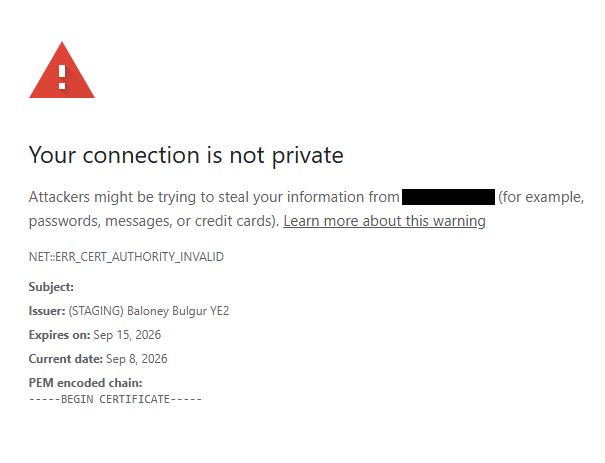
systemctl reload apache2Given that we used --staging you should get a “Your connection is not private” NET::ERR_CERT_AUTHORITY_INVALID error, “Issuer: (STAGING) Baloney Bulgur YE2”:
Requesting production certificate
First, we’re going to disable the SSL site again, as it may cause the challenge to fail:
a2dissite default-ssl.conf
systemctl reload apache2This time the same command, sans the --staging:
certbot certonly --preferred-profile shortlived --webroot --webroot-path /var/www/html --ip-address {YOUR_IP}

# Output

What would you like to do?
- - - - - - - - - - - - - - - - - - - - - - - - - - - - - - - - - - - - - - - -
1: Keep the existing certificate for now
2: Renew & replace the certificate (may be subject to CA rate limits)
- - - - - - - - - - - - - - - - - - - - - - - - - - - - - - - - - - - - - - - -
Select the appropriate number [1-2] then [enter] (press 'c' to cancel): 2If you get this error:
Renewing an existing certificate for {YOUR_IP}

Certbot failed to authenticate some domains (authenticator: webroot). The Certificate Authority reported these problems:
  Identifier: {YOUR_IP}
  Type:   unauthorized
  Detail: {YOUR_IP}: Invalid response from http://{YOUR_IP}/.well-known/acme-challenge/...: 404

Hint: The Certificate Authority failed to download the temporary challenge files created by Certbot. Ensure that the listed identifiers serve their content from the provided --webroot-path/-w and that files created there can be downloaded from the internet.

Some challenges have failed.
Ask for help or search for solutions at https://community.letsencrypt.org. See the logfile /var/log/letsencrypt/letsencrypt.log or re-run Certbot with -v for more details.
Check the logs for what happened, re-run the command with -v (--verbose) for more info. In my case, I used the wrong webroot path which explains the 404.
To the HTTP configuration file you can add a redirect to HTTPS:
<VirtualHost *:80>
	...
	RewriteEngine On
	RewriteRule ^ https://{YOUR_IP}%{REQUEST_URI} [END,NE,R=permanent]
</VirtualHost>a2ensite default-ssl.conf
systemctl reload apache2The site should now redirect to HTTPS and have a valid certificate from LetsEncrypt to go with it.
Setting up automatic renewal
When requesting the cert, my output included “Certbot has set up a scheduled task to automatically renew this certificate in the background.” so the certificates themselves should automatically renew and you can use the following command to simulate the renewal process:
certbot renew --dry-runIn my case it successfully simulated the renewal of the short-lived IP certificate as well as the existing certificates for other domains that were set up using an older version of Certbot that was installed via apt.
The following command also checks that Certbot installed via Snap is properly working to automatically run renewals:
systemctl status snap.certbot.renew.timer
● snap.certbot.renew.timer - Timer renew for snap application certbot.renew
Loaded: loaded (/etc/systemd/system/snap.certbot.renew.timer; enabled; preset: enabled)How ever Apache will hold the certificates in memory and will not use the renewed cert unless the service is reloaded – for that reason you’ll need to set up a --deploy-hook to do that.
Since our original command didn’t contain --deploy-hook "systemctl reload apache2" we’ll have to reconfigure:
# Find out the cert names
certbot certificates

# Reconfigure
certbot reconfigure --cert-name {CERT_NAME/YOUR_IP} --deploy-hook "systemctl reload apache2"

# Output:
- - - - - - - - - - - - - - - - - - - - - - - - - - - - - - - - - - - - - - - -
You are attempting to set a --deploy-hook. Would you like Certbot to run deploy
hooks when it performs a dry run with the new settings? This will run all
relevant deploy hooks, including directory hooks, unless --no-directory-hooks is
set. This will use the current active certificate, and not the temporary test
certificate acquired during the dry run.
- - - - - - - - - - - - - - - - - - - - - - - - - - - - - - - - - - - - - - - -
(R)un deploy hooks/(D)o not run deploy hooks: RYou can inspect the /etc/letsencrypt/renewal/{YOUR_IP}.conf file to verify that a renew_hook line was added.
Leave a Reply