The dynamic links interface will appear on the block toolbar when using Element or Text blocks with the HTML tag name <a>:
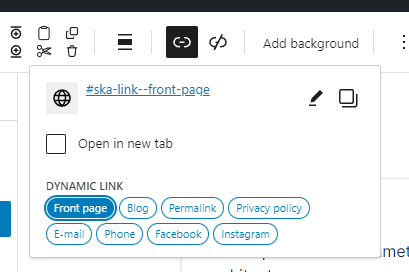
Not to be confused with another “link” item on the toolbar that is used for adding a link to Rich Text (as in it will not add a link to the block’s root element, but will wrap some part of the text inside the block in an additional <a> element which is not valid HTML):

Some of the Dynamic links (E-mail, Phone, Facebook, Instagram) on the above example picture are static links from the Dynamic content option. The Front page, Blog, Permalink and Privacy policy links, how ever are registered via Dynamic links API provided by ska-blocks plugin.
Add a dynamic link
Additional programmatic dynamic links can be registered with the following code:
add_action('ska_blocks_init', function() {

	ska_blocks()->get('dynamic-links')->register_dynamic_link([
		'slug' => 'link-slug',
		'label' => 'Link title',
		'callback' => function($link_attrs, $block) {
			return 'https://example.com';
		},
		'is_active' => function($link_attrs, $block) {
			return false;
		},
	]);
});You should provide a slug, label and a callback to the register_dynamic_link function. is_active function is optional.
The arguments for the callback functions are as follows:
/**
 * @param array $link_attrs Array containing link attributes.
 * @param WP_Block $block Block instance.
 */
Once added your dynamic link should show up under Dynamic links when editing a link of Element or Text blocks.
Filter a dynamic link
Basic dynamic links that have been created through the ska-blocks -> Dynamic content -> Dynamic links UI can be filtered using the ska_blocks_user_dynamic_link filter:
add_filter('ska_blocks_user_dynamic_link', function($link, $slug) {
	/** Translate reservation URL on English pages. */
	if($slug === 'reservation' && substr(get_locale(), 0, 2) === 'en') {
		return home_url('/en/reservations');
	}
	return $link;
}, 10, 2);The above example is using a filter to change the dynamic link’s value on a multilingual site in a different language.